Along with measuring temperatures, I want to measure the energy we're using to maintain them. We have a Elstar BK-G2,5 MT gas meter, to which I want to retro-fit the ability to remotely read it.
Measuring temperatures is nice, but it you want to use that information to do something useful, like reduce the amount of energy you use, then we also want to measure that energy consumption. Our house heats primarily with gas, but the meter doesn't come fitted with any built-in way of remotely reading the usage.
We have an Elster "BK-G2,5 MT" gas meter, which appears to be a brand of Honeywell. They also make a series of "Low Frequency Pulse transmitters", these work with a reed switch held below the dial, and the ten's number contains a magnet, that rotates once every 10 litres, which can be seen on a diagram on the data sheet (IN-Z61–IN-Z65). These transmitters are, with some variations, mostly just a plastic housing with a reed switch that opens and closes as the magnet goes past. The are also expensive and not complete on their own. The most basic, IN-Z62, costs around 40€, but that's only the sensor. It doesn't include anything to send that data.
So instead I thought I could build my own, using an ESP8266 micro-controller, and send the results straight to the MQTT broker for storing.
This method can only give you the change in reading, e.g. every time you use 10 more litres of gas, it will record that, and not the absolute value of the meter. In lots of ways the changes are an easier format, you can the simply aggregate per hour, day, or month to get an overview of when you're consuming the gas. It you want to read the absolute value, you either have to save a start value, and hope you don't miss a single rotation, or do something cleverer with reading the numbers on the dials, which is possible.
Hall Sensor
My first plan was to use a Hall Sensor instead of a ribbon switch to read the magnet. I thought this would be a good idea because ribbon switches can require quite precise positioning to work with a magnet, which can be annoying if I'm not using a purpose built housing, they're also cheap and don't wear out as they don't have any moving parts1.
I used a AH49E Hall sensor, that came on a small board sold as KY-035, that returns a range of values depending on the strength of the current magnetic field.
The first experiments went pretty well, instead of starting with sending all that data to the broker, I instead read the value every half second with an Ardunio, and wrote the results to an SD card as a CSV file, and let it run for a day or so.
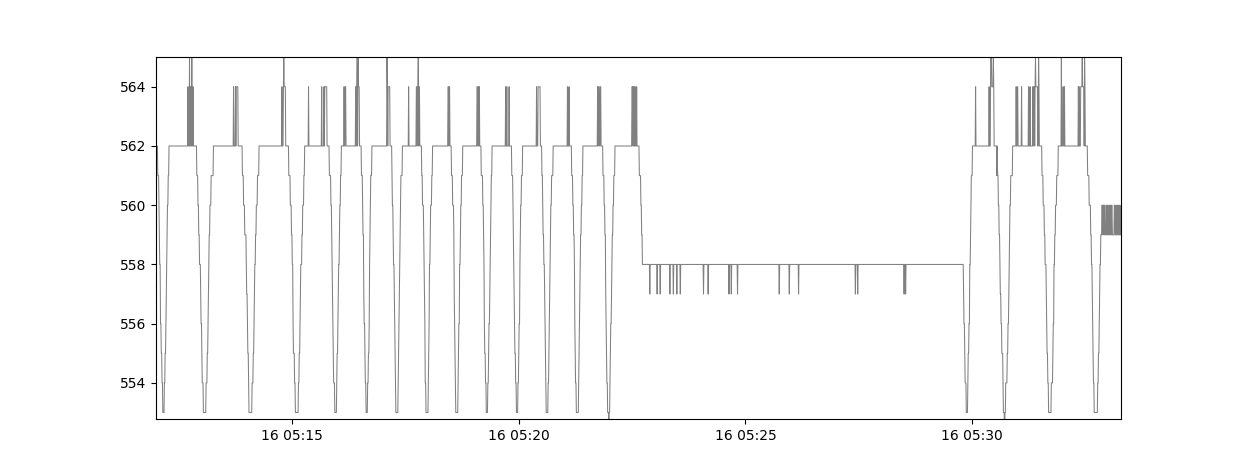
The times are only approximate, and I used them only to calibrate roughly with some hand readings I made. The 'pulses' are every 10m3, and not the absolute value of the gas meter, so if you want that value you, you have to add the total number of rotations to some start value that you've read.
Generally the readings look smooth, with only a small amount of bounce that's much smaller than the total 'real' range of readings; and you can clearly see the rotations, and a longer phase where the dial paused mid rotation. With some simple smoothing logic, and then calculating when the readings change direction and start getting larger again, it was possible to mark each rotation.
The next step was then to move this to the WiFi capable ESP8266, and send a note of each rotation back to the base station….simple, right?
Sadly that didn't prove so easy. It caused me endless frustration as, after moving the code over and adding the simple MQTT transmission elements, my new DIY 'smart meter' kept vastly over counting the rotations of the dial. I checked all sorts of different things, before making the decision to again attach and SD card, and write all the raw values to it, to see what was happening - which was then painfully obvious:
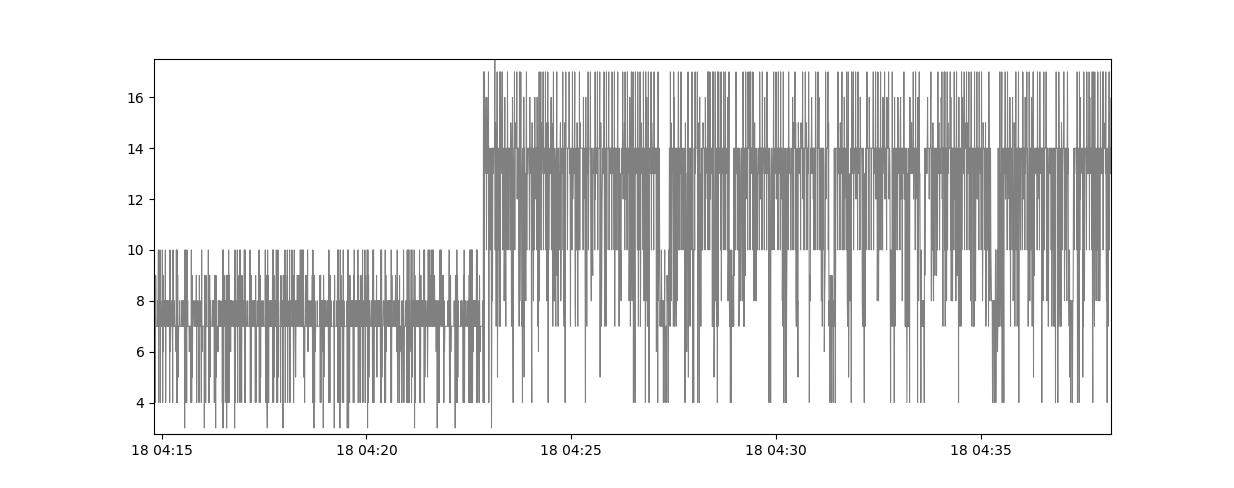
While you can perhaps see some trend through the haze, somehow the WiFi was causing the Hall sensor problems, and creating massive amounts of noise, resulting in the erroneous readings as it kept jumping up and down frequently.
I tried, and failed, with a few countermeasures. Making the wire between the ESP8266 and the sensor very long didn't cause much of a change, nor did careful orientation of the micro-controller and the sensor. I did briefly try and see if I could somehow remove the noise in the code; but the noise was too random, and the underlying signal is a very slow, irregular pulse, with sometimes hours between 'real' changes.
So I gave up, and went with the ribbon switch, like I should probably have done in the first place, taking the hint that if the people who make the meter did it that way, there was probably a good reason for it.
Ribbon Switch
The good news is that in principle the ribbon switch is much simpler than the Hall sensor, and so the code is much simpler. As the magnet rotate it get close to the ribbon switch it closes, and then opens again as the magnet moves away after the dial has gone through 0. So we just count when the connection breaks, and then send a reading of 10 more litres back to our server, where I had included the code to accept gas readings previously.
I ended up getting a ribbon switch on a board, which comes with the unnecessary extra of a glowing LED to show it's closed, but that somehow felt less wasteful than the alternative of buying a pack of 20-50, which would have been cheaper per switch, to more overall. The switch itself doesn't need any more circuitry than the ESP8266 provides by itself.
While I'm not sure about all my reasons for having tried a Hall sensor first, one concern with the ribbon switch did turn out to be true, and that's the positioning. For the ribbon switch to work correctly, it needs to be aligned correctly with the magnet to pull it closed. For me this meant that positioning the ribbon switch was very fiddly, and the lighting when closed LED actually became very useful. So fiddly, and precise, that I ended up building a very ugly and convoluted way of mounting the ribbon switch on its board, and the ESP8266, out of a old scrap piece of balsa wood and a long threaded length of rod that passed through the gas meters mounting hole. This allows me to rotate it and move it up and down very precisely, until it's in just the right position.
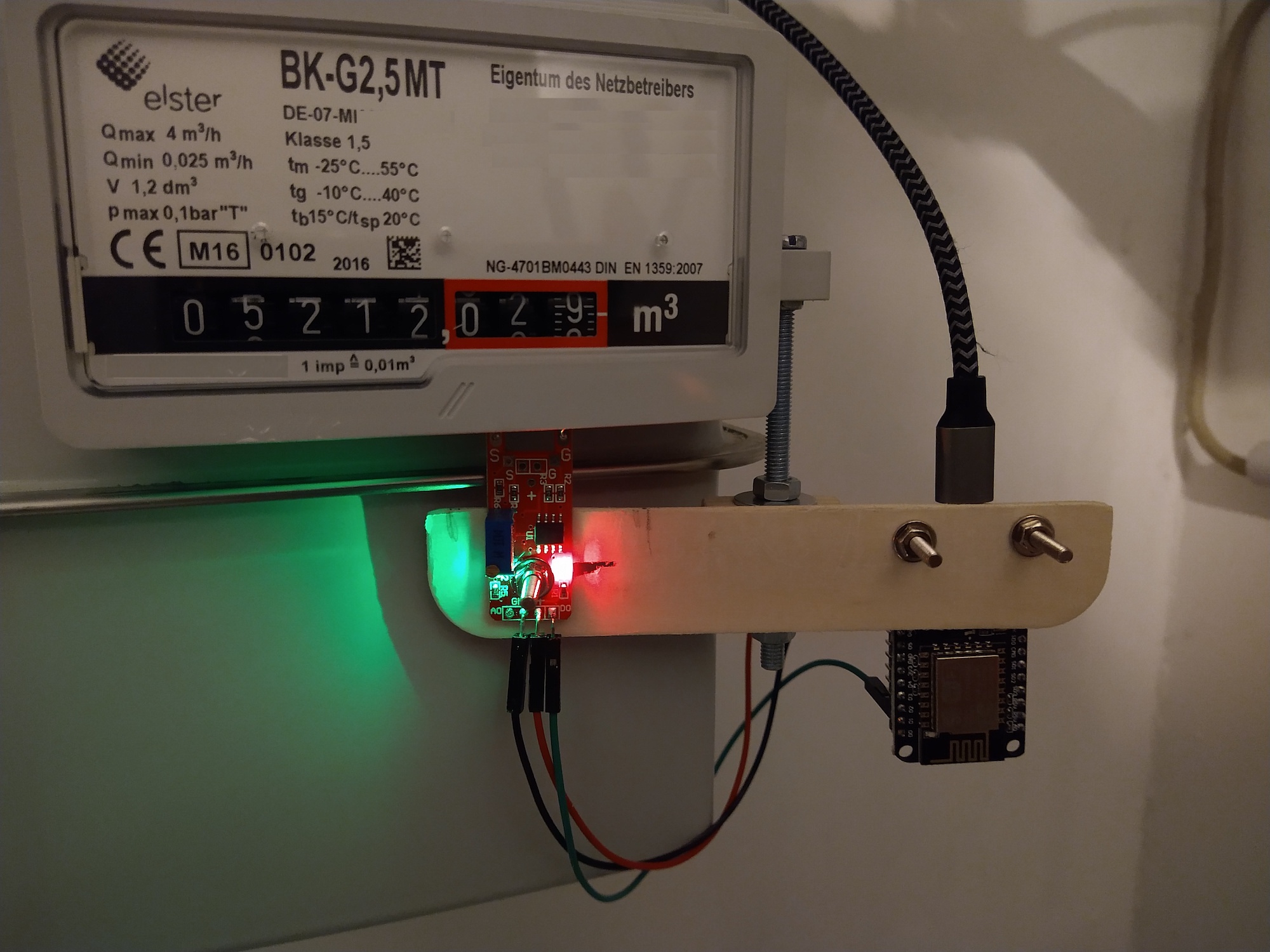
If you have more time an patience, you can create your own much neater solutions, but in the spirit of 'getting it done', I'm fighting my urge for perfection and calling this job complete.
Accuracy As A Gas Meter
I wanted to check how reliable and accurate the recordings were, so in the table gasUse (as created by the store-mqtt-data script) I included the boolean column 'is_meter_reading'. Then with the following SQL I can insert an actual reading taken from the meter:
insert into gasuse
       (timestamp_utc,
       station_id,
       volume_l,
       is_meter_reading)
values
(strftime('%s', '2023-04-16 20:00:00+02:00'),
'manual reading',
123400,
1);
I then also created a view vGasMeter which sums the last manual reading and all the intermediate readings together to give me what the sensor has recorded since the last time, which, if all runs perfectly should (to within 10 litres) match what the actual meter reads.
CREATE VIEW vGasMeter
       AS select sum(volume_l) from gasuse
       where timestamp_utc >=
       (select timestamp_utc from gasuse
       where is_meter_reading = 1
       order by timestamp_utc DESC limit 1);
Since installing the meter and writing this post, 120 days have passed2 and I can see how reliable the sensor has been. I don't have anything to compare to, so I'm not sure how good this is compared to other solutions, but I seem to be missing around 1.3% of the usage.
In those 120 days we've used 115,000 litres (divide by one thousand to get metres cubed, divide by some other number to whatever other archaic units you care for) of gas, and the sensor missed 1450 litres, or 145 rotations. Why it missed them I'm not sure. It could be that the reading never arrived at the Raspberry Pi, the Pi was briefly turned off, or that the sensor missed a particular reading. It would be better if it never missed any, but in order to understand usage trends (e.g. when do we use the most gas) this is probably fine.
Overview: Home Sensor Overview