With sensors in place, a server collecting the inputs, and some weather data, it's time to create a way of easily seeing that's going on. Enter the Web View.
My V1 Raspberry Pi has now been quietly sitting in the basement for more than a year, diligently collecting data from various sensors. Now it's time to be able to easily see what it's been collecting. The easiest way of doing this is to create a website that it can host, and then display on any phone or computer connected to our home network. There are lots of pre-built ways of doing this, like Grafana, but as with everything else in this project I'm aiming for simple and self made.
But what do I want to see. For the first version there will only be two parts: the overview/landing page that should show a summery of all the current temperatures in the rooms that have sensors, plus the latest outside temperature downloaded from the weather service. The second would be to look at the temperature trends in different rooms, especially next to the outside temperature. In the winter, with the heating on this won't be too exciting, if the heating is working as intended the rooms should be holding their temperature, regardless of what happens outside. In the summer it could be more interesting as we can compare what's happening outside with the inside, and perhaps see what techniques are best for keeping the house cool.
Web Stack
Broadly there are two ways of doing this; either have the server generate the whole page, and pass that through a web server, or have a mostly static page filled with JavaScript that then makes API calls to request the data it needs.
The second option probably involves much more JavaScript than I want (which is any1), and would mean creating an API with FastAPI or similar. This is the more modular approach, as it allows you to separate different functions, both technically (have separate API, Database and web servers) and organisationally - these tasks go to different teams working on different parts of the 'the stack', with little interference, if everyone sticks to the agreed interfaces. You can also serve different consumers with the same API; perhaps sometimes it's used in a webpage, or sometimes used by some IoT device somewhere else that displays the information.
But I'm just a one man band, doing all of this on one machine. If I'm going to have to do some back-end work anyway, I might as well just do all of it that way, and have my choice of languages. It's a less flexible solution, as each page will have to be templated and generated with it's own calls (but could be re-used functions), but I it's not like an API would be called in a lot of different places, …yet. If I was setting this up so different devices could call up the data and display them, perhaps an e-ink screen in a room or something, then the API approach would again make more sense.
Again I'll look to Python to provide. In this case I'll be using the 'micro-framework' Flask to create the website. That can query the database, and generate the required pages. Charts will be provided by Plotly, which has a good Python library. This also avoids me needing to write any JavaScript, as I can just include the Plotly JS code in the webpage, and use the Python library to inject the relevant JS and HTML into the page template.
Doing it this way might be more demanding on the Pi than just having an API, but I suspect the most demanding part won't be the generating of the HTML, but running the queries on the database.
The Webpage
For the first version of the site I want two things: a quick overview of the current temperatures in and outside the house, and also a way of viewing the temperature history in one, or multiple locations across any time period. That way you can see how different rooms react to the outside temperature, or other weather conditions. Oh and 'mobile first', not because that's the future of the internet, but most of the time I'll be checking of from my mobile, and so will probably the other 50% of the potential users (my wife).
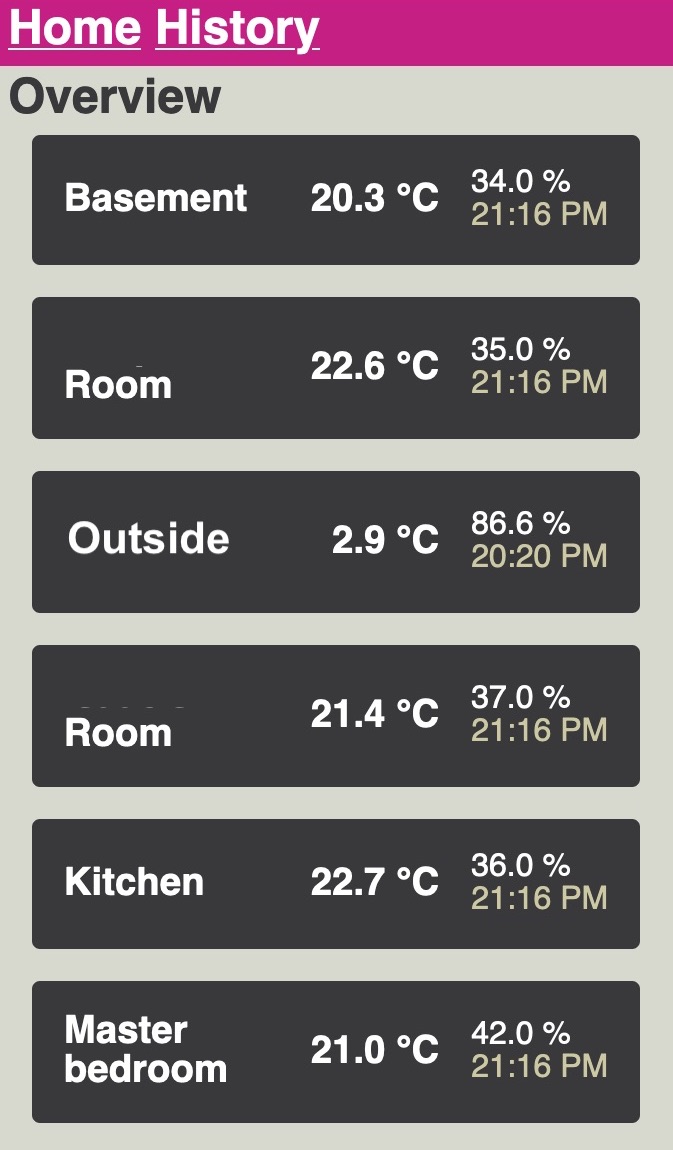
After working through the Flask tutorial, and understanding some of the confusion around the concept of the 'app', I managed to put together the simple two page site, along with some forms to help set different options, like which locations you want to see and a date range picker.
One element that was a little tricky was creating a mobile template for the Plotly line chart, which can be found in plotlythemes.py. The default template has far too much padding and space to work on a tall and narrow mobile screen, so I created a customised one called "light_mobile" that fills the screen when the 'mobile' view is selected (the default). This also makes the plot static, otherwise the plot is interactive by default, which is fine if you have a mouse, but works very badly on a touch screen. Partly because it becomes a finger trap, and instead of being able to scroll the page, you end up just zooming around the chart.
While you can set many options in the template, I couldn't set defaults for all. That includes the y-axis; which irritatingly it doesn't appear to be possible to put inside the axis lines, nor turn off in the template. So I added an annotation that said "Temperature °C", and have to delete the label when calling the chart creation. That's mostly annoying as if I want to use the template to plot something else, like Humidity, then I suspect I'll also have to do that on the fly instead of setting it all up in the template.
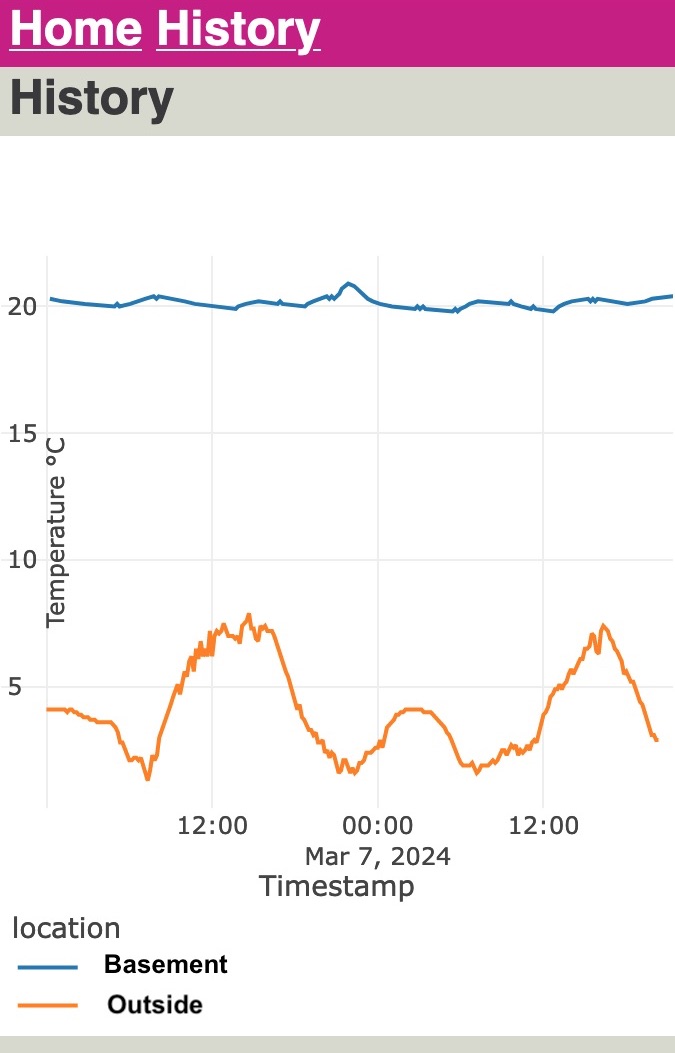
Plotly defaults to rendering a whole page, with the JS bundle included, but does include good options for just creating just the chart, so you can plug only that part into a pre-created page, at generation time.
Generating the rest of the pages was relatively harmless, but there are only two of them. Getting them looking nicer, and usable for fat thumbs took a bit more work, but thanks to some help from my web front-end developer wife, it was possible to create something usable on mobile that doesn't look too terrible, but the the ugly parts are all proudly my own work.
There's lots of places it could be better, like a better colour palette. I like pink (along with dark oranges) as a strong lead colour choice; normally your options are some variation on red, blue or green; which feel too commonly used. But at the moment it's a slightly uncoordinated set of colours that don't feel very cohesive.
All the code for the site is available in my home-sensor-website repository.
Serving the Site
WARNING! Don't use the following set-up to run a server that's exposed to the internet. Everything I'm doing below is running on a private home network, without any ability to connect in from outside. If you wanted to run this on the open net, you'd have to take a lot of extra steps (like a firewall)
The best way of serving a Flask site in production is to use a WSGI server, and a web proxy. I picked Gunicorn for the WSGI server, and Nginx2 as the webserver, which appears to be a common combination, and I could find examples of the configuration files online.
Because this is just running in a private network I could make my life a bit easier by just using the Nginx version in the Raspberry Pi OS repositories, but normally a webserver is something you want the latest version of with the latest security updates.
One security feature I did add was serving the page over TLS with a self-signed SSL certificate. Along with this project I've been learning from Jeff Geerling's excellent Ansible for DevOps book, as a way of learning more about Ansible, and having a better workflow for home projects. That includes an example of an Nginx server in Chapter 14, which I heavily copied for that part of the deployment.
The main reason for adding this is to stop mobile browsers complaining, or even disallowing the site. Many will now refuse to connect over plain HTTP. It's not quite perfect though, and on Chrome and Firefox mobile I still get a warning that this is a self-signed certificate, and I have to click through either an 'advanced' option or a security warning, which is a bit tiresome.
For the internal network I use a domain name I own, but doesn't have any public websites, which avoids confusion. Looking around it appears the only solution to the complaints from the browsers about the self-signed certificate would be to create a public site that could generate a not self-signed certificate, via Let's Encrypt or similar, and then re-use that internally. That way the browser can verify that the certificate is the once associated with that domain. Perhaps one day, but that job is also going onto the 'do it later' list.
Deployment with Ansible
As with the rest of this project I've been working with Ansible to standardise and automate the deployments, building and testing a local virtual machine created via Vagrant.
On the whole this has worked well, and with only a few exceptions everything done in the Debain 11 VM was transferable to the Pi; there isn't a Raspberry OS specific Vagrant box available. Once difference was that I need the additional dependency of 'libopenblas-dev' on the Pi, otherwise I couldn't create the SSL certificates.
The playbook for this part of the project has been added to the others available on GitHub.
Server Performance and SQL Optimisation
As mentioned before, this is running on very modest hardware. For the MQTT broker and subscription this hasn't been a problem, and the Pi has been running since November 2022 without complaint, storing at first weather data, and then the sensor data.
Compared to that, serving the website and running larger queries on the SQLite3 database a much more demanding.
The first example of this was having to reduce Gunicorn to one worker process. The default is two, but in the SystemD service file, and when trying manually, this would cause the processes to constantly fail, with out of memory errors. Even though my rough trouble shooting (looking at top while starting them up) didn't seem to show heavy memory use, rather very high CPU use), reducing it to one worker let it run.
Loading the overview page is pretty quick, but already when clicking onto the initial 'short history' view, of the chosen location it takes a few seconds to think about it. The initial 'short history' view is the same page as for any temperature history, but with defaults to only show that particular location, and the outside temperature, since midnight the day before.
When selecting more locations, and a longer period of time, it does take quite a while to load. To give some scale; as of writing the SQLite DB is 23Mb (7.2Mb compressed). The first table to be populated is the outdoor temperature history (table 'meteoTemps') starting on 25th November 20223 and is now 67,000 rows, and the next biggest is the sensor temperature (a table imaginatively named 'temperature'), which started on 28th December 2022 (about a year and a quarter ago) and has already grown to 117,000 rows. That's not nothing, will only continue to grow, and that's already with the optimisation that it's not storing every temperature reading, but a maximum of once every ten minutes, if the temperature is different to the last recorded value.
The history query takes these two longest tables, and then unions them together, joins in the stations table to give each sensor it's location and then filters on the locations and a date range, plus a small filter to get rid of a few random sensor mis-readings.
Initially the query unioned the tables together, and then applied the filters on date range (and temperature limit to remove the irregularities), and there weren't any indexes on the tables.
I made two main changes; the first was to add an index on the timestamp column on both temperature tables, this is the column most used in filtering, and so creating an index speeds up searching through it, I found reading the SQLite documentation on the query planner pretty helpful.
Some playing around with the EXPLAIN QUERY PLAN showed a few changes that implied the query was now better, and I did feel like I saw a small improvement in load times. Secondly moving the time range filter from the unioned result (that doesn't have an index, but each part does), to each sub-part before the union also helped.
Given that I'm also doing a search on the station_id (so that of the sensor) it might be worth adding a two-column index on that, for a slight further improvement. Another change I'm thinking of making is cleaning the input data a little more. In both the weather data and the indoor data, there are occasional super-low temperatures (specifically -47.5°C for the sensors, not sure why that exact number) in the data, but very rarely. e.g. out of the ~117,000 rows, there are only 89 with this issue. Being able to remove that filter on the query might then be helpful.
Next Steps
So, it's up and running, hurrah! and now I can get a basic temperature history for various locations and compare them to outside temperatures. Maybe not much, but it's a start. It also means I should be able to add more features and roll them out quickly when I do.
As far as the webpage goes, there are a few things that would be good to add. First is a summary view that allows me to group the results by hour, or day. That way you can see more general trends without the noise of the raw results, and you might be able to spot trends across days more easily.
The other big missing feature is the results for the gas meter I added. That's still happily collecting data, it would also be something that's worth plotting against the outside temperature, or at least an average thereof, as I think the gas usage would always have to be grouped by some time interval to see when more or less is used.
This could extend then also to plotting other types of weather data together e.g. the amount of sunshine, wind or rain, in combination with the gas, or other sensor readings. That's going to be a very complex set of SQL queries to manage, and probably quite taxing, if I want to make available multiple combinations of readings and plot them on a graph. Here I should think about what I might frequently want to see vs just reading the data from a copy of the database into a Python script and then plotting it there.
Overview: Home Sensor Overview